Feb 12, 2026
Anatomy of a High-Converting Landing Page in 2026
Landing pages are the workhorses of digital marketing. Whether you're launching a product, generating leads, or promoting an event, a well-designed landing page can mean the difference between a 2% conversion rate and a 40% conversion rate.
But what makes a landing page convert in 2026? The fundamentals remain—clear value proposition, compelling copy, strong call-to-action—but modern users expect more. They demand faster load times, mobile-first experiences, and authentic social proof.
In this guide, we'll dissect the anatomy of a high-converting landing page, examining each essential element and how to optimize it for maximum conversions.
What is a High-Converting Landing Page?
A landing page is a standalone web page created specifically for a marketing or advertising campaign. Unlike your homepage, which serves multiple purposes, a landing page has one goal: conversion.
High-converting landing pages share these characteristics:
Single, focused objective (sign up, buy, download, register)
Minimal navigation to reduce distractions
Clear value proposition above the fold
Compelling copy that addresses pain points
Strategic visual hierarchy guiding users to action
Optimized for mobile devices
Fast load times (under 3 seconds)
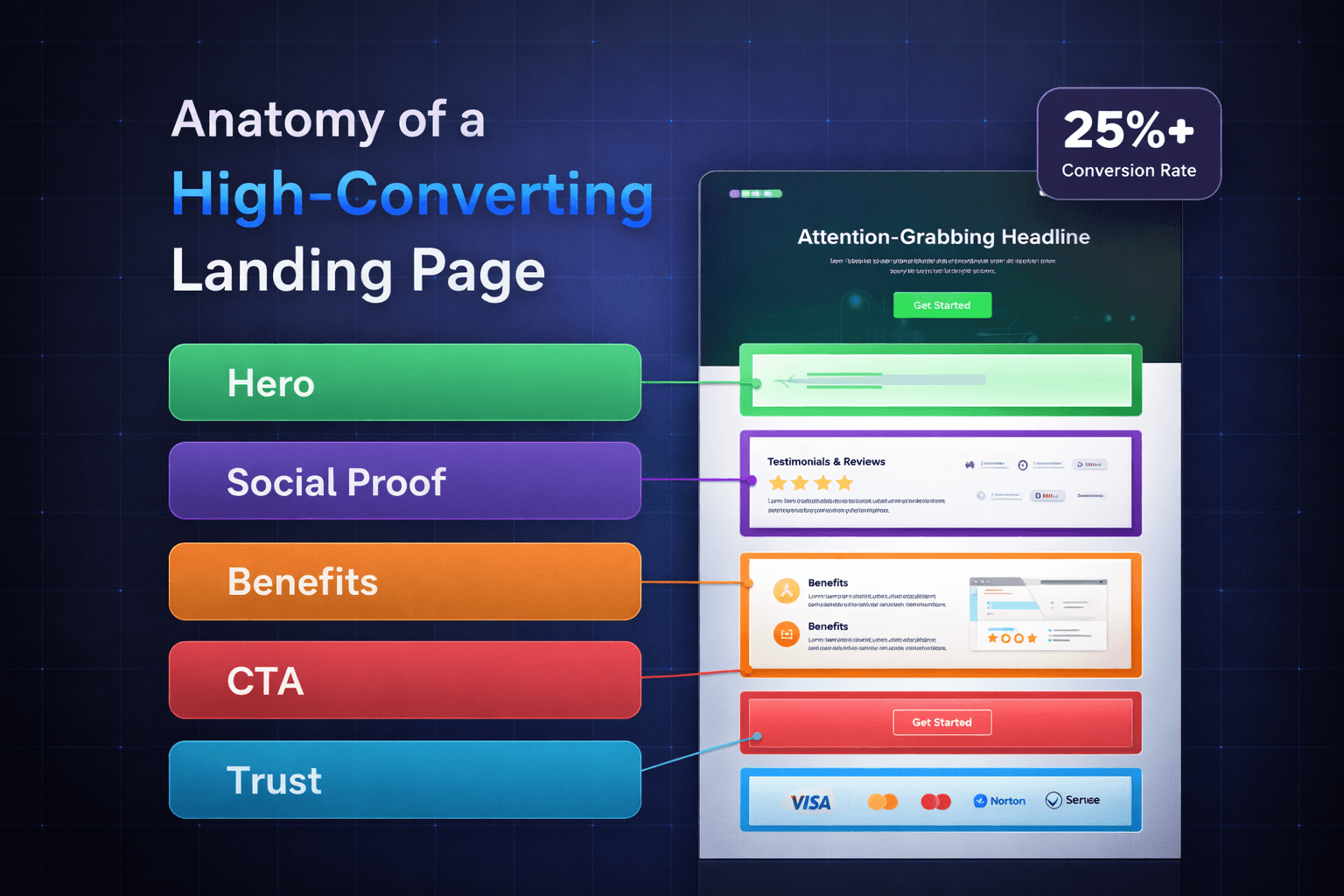
The average landing page conversion rate across industries is 9.7%. Top performers achieve 25%+ conversion rates. The difference? Understanding and implementing the core elements we're about to cover.
The Essential Elements of a High-Converting Landing Page
1. Hero Section: Your 3-Second Pitch
The hero section is the first thing visitors see. You have approximately 3 seconds to convince them to stay. This section needs to immediately answer: "What's in it for me?"
Critical Components:
Headline (H1): Your headline should communicate your unique value proposition in 10 words or less. Make it benefit-focused, not feature-focused.
❌ Bad: "Advanced AI-Powered Analytics Platform" ✅ Good: "Turn Data Into Revenue in Minutes, Not Months"
Subheadline: Expand on your headline with supporting details. Address the problem you solve or the outcome users achieve.
Example: "Join 10,000+ marketers using AI to identify high-value customers and increase ROI by 300%"
Hero Image or Video: Visual elements should reinforce your message, not distract from it. In 2026, consider:
Product screenshots showing the interface in action
Short video demos (15-30 seconds, autoplay on mute)
Illustrations that explain your concept visually
Real customer photos (not stock images)
Primary CTA Button: Your call-to-action should be impossible to miss. Use contrasting colors, action-oriented text, and position it prominently.
Best practices for CTA buttons:
Use first-person language ("Start My Free Trial" vs "Start Your Free Trial")
Create urgency without being pushy ("Get Started Now" vs "Submit")
Make it large enough to tap easily on mobile (minimum 44x44 pixels)
Use high-contrast colors (test with accessibility tools)
Trust Indicators: Add credibility elements like:
"As featured in TechCrunch, Forbes, Wired"
"Trusted by 50,000+ businesses"
Security badges (SSL, GDPR compliant, SOC 2)
Award badges or certifications
2. Social Proof: Validation That Builds Trust
People trust people more than they trust companies. Social proof leverages this psychological principle to reduce friction and increase conversions.
Types of Social Proof That Work in 2026:
Customer Testimonials: Move beyond generic praise. Include:
Specific results achieved ("Increased conversions by 43%")
Real names, photos, and job titles
Company logos (for B2B)
Video testimonials (highest impact)
Case Studies and Success Stories: Short-form case studies work better than long PDFs. Use this format:
Challenge: What problem did they face?
Solution: How did your product help?
Results: What measurable outcomes did they achieve?
User Reviews and Ratings: Display aggregate ratings from platforms like G2, Capterra, or Trustpilot. Include the number of reviews for credibility.
Example: "4.8/5 stars from 2,847 reviews on G2"
Social Media Proof: Showcase user-generated content, follower counts, or engagement metrics if impressive.
Real-Time Activity: "37 people signed up in the last hour" or "1,247 active users right now"
Customer Logos: For B2B, display recognizable company logos. Group by industry or company size if relevant.
Pro tip: Place testimonials near friction points. If you ask for an email, show a testimonial about email privacy. If you mention pricing, show ROI testimonials.
3. Benefits Section: What's In It For Them?
Features tell, benefits sell. Your benefits section should clearly articulate how your product improves users' lives or businesses.
Structure for Maximum Impact:
Benefit-First Headlines: Lead with the outcome, support with features.
❌ Feature-focused: "Real-time collaboration tools" ✅ Benefit-focused: "Ship Projects 2x Faster With Your Team"
The 3-Column Layout: Present 3-6 key benefits using this proven structure:
Icon or visual element
Benefit headline
1-2 sentences of supporting copy
Use the "So What?" Test: For every feature you mention, ask "So what?" until you reach the core benefit.
Feature: "AI-powered analytics" So what? → "Automatically identifies trends" So what? → "Saves 10 hours per week on data analysis" So what? → "Spend more time on strategy, less on spreadsheets"
Include Visual Proof: Screenshots, before/after comparisons, or data visualizations make benefits tangible.
4. How It Works: Reduce Complexity, Increase Clarity
Uncertainty kills conversions. If users don't understand how your product works, they won't convert. Simplify your process into 3-4 clear steps.
The 3-Step Framework:
Step 1: [Simple Action] → "Sign up in 60 seconds" Step 2: [Easy Process] → "Connect your data sources" Step 3: [Desired Outcome] → "Get actionable insights instantly"
Visual Enhancements:
Use numbered steps or icons
Include screenshots for each step
Add estimated time for each step
Use directional arrows or flow indicators
Address Objections: If setup is genuinely complex, acknowledge it and explain why it's worth it. Honesty builds trust.
5. Pricing Section: Transparent and Strategic
Pricing anxiety is real. How you present pricing dramatically impacts conversion rates.
Pricing Best Practices for 2026:
Transparency Wins: Hidden pricing creates distrust. If you can show pricing, do it. If your pricing is truly custom, explain why.
Three-Tier Strategy: Offering three plans creates a psychological anchor. Most users choose the middle option.
Basic: Low price, attracts price-sensitive users
Professional: (Most Popular) - Your sweet spot
Enterprise: High price, makes Professional seem reasonable
Highlight the Best Value: Use visual cues like "Most Popular" or "Best Value" badges on your recommended tier.
Annual vs Monthly: Show both options with savings clearly displayed. Example: "Save 20% with annual billing"
Remove Risk with Guarantees: "30-day money-back guarantee" or "Cancel anytime, no questions asked"
Comparison Tables: Help users choose by comparing features across plans. Make it scannable with checkmarks and crosses.
Include a CTA on Every Plan: Each pricing tier should have a clear call-to-action button.
6. Objection Handling: FAQ Section
Even compelling landing pages raise questions. An FAQ section addresses concerns before they become conversion blockers.
Strategic FAQ Approach:
Prioritize Common Objections:
"Do I need a credit card to start?"
"Can I cancel anytime?"
"How secure is my data?"
"What happens after the trial?"
"Do you offer refunds?"
Use Expandable Accordions: Save space while keeping all information accessible.
Frame Positively: Turn negatives into positives. ❌ "What if I hate it?" ✅ "What if your product isn't right for me?" → "We offer a 30-day money-back guarantee..."
Include 6-8 Questions: Enough to cover major concerns without overwhelming.
Link to More Resources: For complex products, link to documentation or support for detailed questions.
7. Final CTA: The Closing Argument
Your hero CTA converts motivated visitors. Your final CTA captures those who needed more convincing.
Final CTA Best Practices:
Restate Value: Remind users what they're getting. "Start Building Better Landing Pages Today"
Use Different Framing: If your hero CTA said "Start Free Trial," your final CTA might say "Get Started Now" or "Join 10,000+ Users"
Add a Secondary CTA: Offer an alternative low-commitment action for hesitant users. Primary: "Start Free Trial" Secondary: "Watch a 2-Minute Demo"
Include One Last Trust Element: Final testimonial, guarantee reminder, or security badge.
Make It Visually Distinct: Use color, whitespace, or background to make this section stand out.
8. Trust and Security Elements
In 2026, users are more privacy-conscious than ever. Address security concerns proactively.
Essential Trust Elements:
Security Badges: SSL certification, GDPR compliance, SOC 2, ISO certifications
Privacy Reassurance: "We never sell your data" or "Your information is encrypted and secure"
Industry Credentials: Awards, certifications, memberships in industry organizations
Team Photos: For B2B or service businesses, showing real team members builds trust
Contact Information: Visible email, phone, or chat option signals legitimacy
Media Mentions: "As seen in" logos from reputable publications
9. Mobile Optimization: The Non-Negotiable Priority
In 2026, over 60% of web traffic comes from mobile devices. Your landing page must work flawlessly on smartphones.
Mobile-First Considerations:
Responsive Design: Elements should reflow naturally, not just shrink. Test on actual devices, not just browser simulators.
Tap-Friendly CTAs: Buttons need adequate spacing and size (minimum 44x44 pixels)
Simplified Navigation: Remove or minimize navigation menus to reduce distractions
Faster Load Times: Mobile users are even less patient. Optimize images and minimize code.
Forms: Minimize form fields. Use autofill attributes. Large, easy-to-tap input fields.
Readable Text: Minimum 16px font size. Adequate line spacing. Sufficient contrast.
Scroll-Friendly Layout: Important information above the fold, but design for scrolling
10. Performance Optimization: Speed Equals Conversions
A 1-second delay in page load time can reduce conversions by 7%. Speed is a conversion element.
Performance Checklist:
Target Load Time: Under 3 seconds on mobile, under 2 seconds on desktop
Image Optimization:
Use modern formats (WebP, AVIF)
Compress images without quality loss
Implement lazy loading
Serve appropriately sized images for different screens
Minimize JavaScript: Remove unnecessary scripts. Defer non-critical JavaScript.
Use a CDN: Content delivery networks reduce latency globally
Browser Caching: Cache static resources for returning visitors
Critical CSS: Inline critical CSS to render above-the-fold content immediately
Test Regularly: Use tools like Google PageSpeed Insights, GTmetrix, or WebPageTest
Advanced Conversion Optimization Techniques
Personalization
Modern landing pages adapt to the visitor:
Dynamic headlines based on ad source
Location-specific content
Returning visitor recognition
Industry-specific messaging for B2B
Smart Forms
Traditional forms kill conversions. 2026 best practices:
Multi-step forms (reduce perceived length)
Progressive disclosure (ask for more info after initial conversion)
Conditional logic (only show relevant fields)
Real-time validation (immediate feedback on errors)
Social login options (Google, LinkedIn)
Exit-Intent Popups
When users move to close the tab, trigger a last-chance offer:
Discount code
Free resource download
"Wait! Before you go..." messaging
Book a demo option
Use sparingly and make it valuable, not annoying.
Scarcity and Urgency
Psychological triggers that increase conversions:
"Only 3 spots left at this price"
"Offer ends in 48 hours" (countdown timer)
"Limited-time bonus included"
Warning: Only use genuine scarcity. Fake urgency damages trust.
Video Integration
Video can increase conversions by 80%+:
Explainer videos (60-90 seconds)
Customer testimonial videos
Product demo videos
Founder story videos
Best practices:
Autoplay on mute (let users enable sound)
Include captions for accessibility
Embed natively (faster than YouTube iframes)
Add video transcript below for SEO
Common Landing Page Mistakes to Avoid
1. Too Many Goals: One page, one conversion goal. Remove navigation that leads elsewhere.
2. Generic Copy: "Leading provider of innovative solutions" means nothing. Be specific.
3. Weak Headlines: Your headline should clearly state what you do and why it matters.
4. Hidden CTAs: Your primary CTA should be visible without scrolling (above the fold).
5. Long Forms: Every field you add reduces conversions by ~10%. Ask only essential questions.
6. Stock Photos: Generic stock images hurt credibility. Use real photos or custom graphics.
7. Slow Load Times: Optimize ruthlessly. Every second counts.
8. No Mobile Testing: Test on real devices, not just desktop browser simulators.
9. Ignoring Accessibility: Alt text, keyboard navigation, sufficient contrast, ARIA labels.
10. No A/B Testing: Don't assume—test everything. Headlines, CTAs, images, layout.
The Landing Page Optimization Process
Building a high-converting landing page isn't a one-time task. It's an ongoing process:
1. Research (Before building)
Study competitor landing pages
Review customer feedback and objections
Analyze successful examples in your industry
Create user personas
2. Build (Initial version)
Follow the anatomy outlined in this guide
Focus on core elements first
Get it live quickly (iteration beats perfection)
3. Test (Baseline performance)
Run traffic for at least 2-4 weeks
Establish baseline conversion rate
Identify drop-off points with analytics
Collect user feedback (surveys, heatmaps, session recordings)
4. Optimize (Continuous improvement)
A/B test one element at a time
Headlines → CTAs → Images → Copy → Forms
Wait for statistical significance (100-300 conversions per variant)
Implement winners, test new variations
5. Scale (Once optimized)
Increase ad spend on proven performers
Create variation landing pages for different audiences
Expand to new channels with similar pages
Tools for Building High-Converting Landing Pages
No-Code Builders:
Framer: Best for designers, beautiful animations, fast performance
Webflow: Maximum design control, powerful CMS
Unbounce: Built specifically for landing pages, extensive templates
Instapage: Advanced personalization and A/B testing
Analytics and Testing:
Google Analytics: Traffic and conversion tracking
Hotjar: Heatmaps and session recordings
Microsoft Clarity: Free session recordings
Optimizely/VWO: Advanced A/B testing platforms
Performance Tools:
Google PageSpeed Insights: Performance analysis
GTmetrix: Detailed performance reports
TinyPNG: Image compression
Real-World Examples and Conversion Rates
SaaS Landing Page: Slack's landing page achieves ~15% conversion with:
Clear headline: "Where work happens"
Customer logos (prominent companies)
Video demo
Free trial CTA
No credit card required
E-commerce: Dollar Shave Club's original landing page converted at 25%+ with:
Humorous explainer video
Clear pricing
Single product focus
Strong brand personality
B2B Service: HubSpot's landing pages average 10-15% conversion using:
Free resources (ebooks, templates)
Short forms (name and email only)
Extensive social proof
Clear value proposition
Checklist: Is Your Landing Page Ready to Convert?
Before launching, verify these elements:
Above the Fold ✓
Clear, benefit-focused headline
Supporting subheadline
Visible CTA button
Hero image or video
Trust indicator
Content ✓
3-6 key benefits explained
Social proof (testimonials, logos, reviews)
How it works section
Pricing (if applicable)
FAQ section
Final CTA
Technical ✓
Mobile responsive
Loads in under 3 seconds
All links work
Forms tested and working
Analytics tracking installed
CTAs tracked as goals
Optimization ✓
Single conversion goal
Minimal navigation
High-contrast CTA buttons
Images optimized
No spelling/grammar errors
Legal requirements met (privacy policy, terms)
Conclusion: The Perfect Landing Page is a Moving Target
There's no universal "perfect" landing page. What converts for SaaS won't work for e-commerce. What works for your competitor might fail for you. What worked last year might underperform in 2026.
The anatomy we've outlined gives you a proven framework, but success comes from:
Understanding your specific audience
Testing relentlessly
Iterating based on data, not opinions
Staying current with design and UX trends
Optimizing for mobile-first experiences
Prioritizing speed and performance
Start with these fundamentals, test rigorously, and you'll build landing pages that don't just look good—they convert.